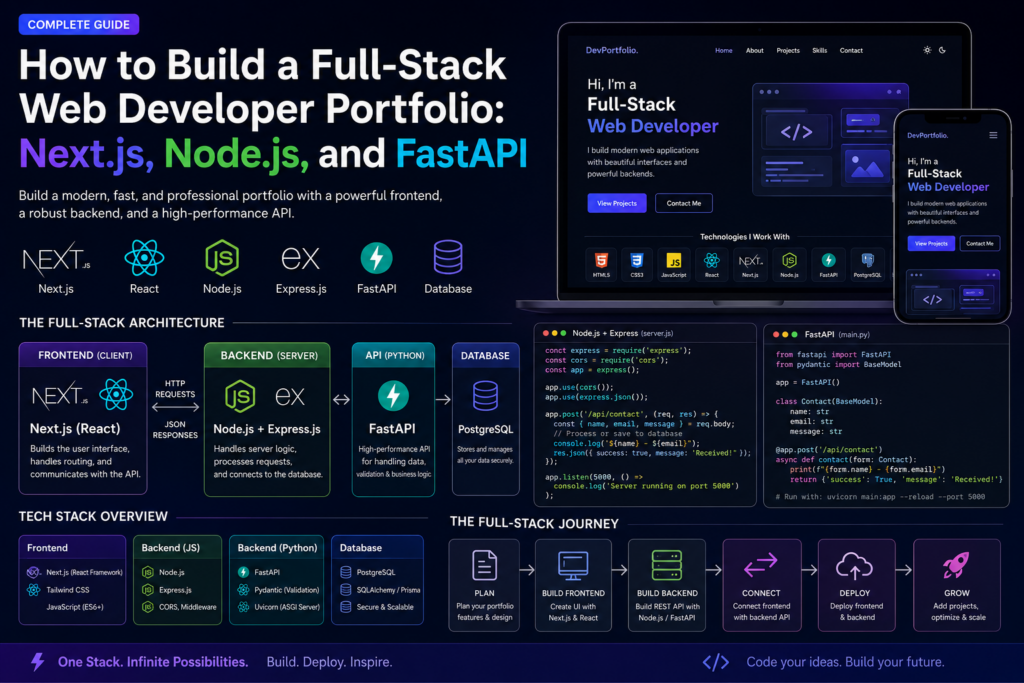
If you’re just starting web development, don’t worry if this looks overwhelming. Think of a website as a house. Every technology in the stack has a different job. Once you understand what each one does, building websites becomes much easier.
What is Full-Stack Web Development?
A full-stack web developer is someone who builds both:
- Frontend – What users see and interact with.
- Backend – The part users don’t see that processes data and handles business logic.
For example, when you fill out a contact form on a website:
- You type your name and message.
- The frontend sends the information.
- The backend receives it.
- The backend stores it in a database or sends it to the website owner.
- The frontend tells you “Message sent successfully.”
That’s full-stack development.
Understanding the Stack
Imagine ordering food online.
Customer
   │
   ▼
Frontend Website
   │
   ▼
Backend Server
   │
   ▼
Database
Each part has a different responsibility.
HTML – The Structure
HTML is the skeleton of a website.
Without HTML there is no webpage.
Example:
<h1>I am a Web Developer</h1>

<p>Welcome to my website.</p>

<button>Hire Me</button>
This creates:
- A heading
- A paragraph
- A button
Think of HTML like building the walls of a house.
CSS – The Design
CSS makes HTML beautiful.
Without CSS:
Hello

Button
With CSS:
- Beautiful colors
- Rounded buttons
- Animations
- Layout
- Responsive design
Example:
body{
    background:#111;
    color:white;
}

button{
    background:blue;
    color:white;
    padding:15px;
}
Now the website looks professional.
Think of CSS as the paint and furniture of the house.
JavaScript – The Brain
JavaScript makes websites interactive.
Without JavaScript:
- Buttons don’t do much
- Forms cannot validate
- Menus don’t open
- Sliders don’t move
Example:
button.onclick = function(){

alert("Welcome!");

}
When the user clicks the button, a message appears.
JavaScript is the brain.
React
React is a JavaScript library.
Instead of writing one huge webpage, React lets us build small reusable pieces called components.
Instead of this:
Website

Navbar

Hero

About

Services

Contact

Footer
React turns them into:
Navbar Component

Hero Component

About Component

Contact Component

Footer Component
Each piece is separate and reusable.
Example:
function Hero(){

return(

<h1>I am a Web Developer</h1>

)

}
Now you can reuse the Hero component anywhere.
Next.js
Next.js is built on React.
Think of React as an engine.
Next.js is the complete car.
It gives you:
- Better SEO
- Faster loading
- Better routing
- Image optimization
- Server-side rendering
- Easy deployment
Most professional React developers now use Next.js.
Node.js
Normally JavaScript only runs inside a browser.
Node.js allows JavaScript to run outside the browser.
Instead of:
Browser

↓

JavaScript
You now have
Server

↓

JavaScript
Now JavaScript can:
- Read files
- Create APIs
- Connect databases
- Send emails
- Process payments
Express.js
Node.js is powerful but complicated.
Express makes Node.js easier.
Instead of writing hundreds of lines,
you simply write:
app.get("/",(req,res)=>{

res.send("Hello")

})
This creates a webpage.
Express handles:
- Routes
- APIs
- Requests
- Responses
- Middleware
FastAPI
FastAPI is similar to Express.
The difference is:
Express uses JavaScript.
FastAPI uses Python.
Example:
@app.get("/")

def home():

    return {"message":"Hello"}
FastAPI is famous because it is:
- Very fast
- Easy to write
- Great for AI applications
- Automatically creates API documentation
API
An API allows the frontend and backend to communicate.
Imagine a waiter.
Customer

↓

Waiter

↓

Kitchen
The waiter is the API.
The customer never enters the kitchen.
Instead:
Customer
↓
Frontend
↓
API
↓
Backend
Understanding the Contact Form
Suppose someone enters:
Name

John

Email

john@gmail.com

Message

I want a website.
When they press Send:
Step 1
JavaScript stops the page from refreshing.
e.preventDefault();
Step 2
The data is collected.
{

name:"John",

email:"john@gmail.com",

message:"Hello"

}
This is called a JSON object.
Step 3
The frontend sends the data.
fetch("http://localhost:5000/api/contact")
This sends it to the backend.
Step 4
The backend receives it.
Node.js:
app.post("/api/contact")
or FastAPI:
@app.post("/api/contact")
Both wait for incoming data.
Step 5
The backend checks if everything is filled.
Name?

✔

Email?

✔

Message?

✔
If one field is empty,
it returns an error.
Step 6
If everything is correct
the backend replies:
Message received.
Step 7
The frontend displays
Message Sent Successfully 🚀
The process is complete.
What is useState()?
React uses state to remember information.
Example:
const [name,setName]=useState("");
Initially
name=""
User types:
John
Now
name="John"
React updates automatically.
What is handleChange()?
Every time you type
A

Ab

Abi

Abigail
React updates the state.
handleChange()
runs every time the user types.
What is handleSubmit()?
When the user clicks
Send Message
React executes
handleSubmit()
This function:
- Prevents page refresh
- Sends data
- Waits for the backend
- Displays success or error
Why do we install Next.js?
npx create-next-app@latest portfolio-frontend
This command creates everything needed for a modern website, including:
- React
- Next.js
- Folder structure
- Routing
- Configuration
- Development server
Instead of building everything manually.
Why install Express?
npm install express cors
- Express helps build the backend quickly.
- CORS allows the frontend (running on one address, such as
localhost:3000) to communicate with the backend (such aslocalhost:5000). Without it, the browser blocks the request for security reasons.
Why run two servers?
During development, you usually have:
Next.js

localhost:3000
and
Node.js

localhost:5000
The frontend and backend are separate applications that communicate through APIs.
Complete Flow
Visitor

↓

Opens Website

↓

Frontend (Next.js)

↓

Fills Contact Form

↓

JavaScript

↓

API Request

↓

Node.js / FastAPI

↓

Checks Data

↓

Database (optional)

↓

Returns Success

↓

Frontend Shows

"Message Sent Successfully"
Beginner Roadmap
As a beginner, don’t try to learn everything at once. A practical learning order is:
- Learn HTML to structure web pages.
- Learn CSS to style them.
- Learn JavaScript to add interactivity.
- Build a few small projects (calculator, to-do list, portfolio).
- Learn React to build reusable user interfaces.
- Learn Next.js to create professional, SEO-friendly React applications.
- Learn Node.js and Express (or FastAPI if you prefer Python) to build APIs.
- Learn a database such as MongoDB or PostgreSQL.
- Combine everything into full-stack projects and deploy them online.
By following this path, you’ll build a solid foundation and understand how all the pieces work together instead of trying to memorize code.